We're Australia and New Zealand's largest Mathcad distributor.
Calculations are the heart of engineering information yet too many companies fail to properly solve, document, and share their engineering calculations. They lose invaluable intellectual property with every new project, resignation or retirement. Mathcad is the first and only engineering calculation solution that simultaneously performs and documents engineering calculations while dramatically reducing the risk of costly errors.

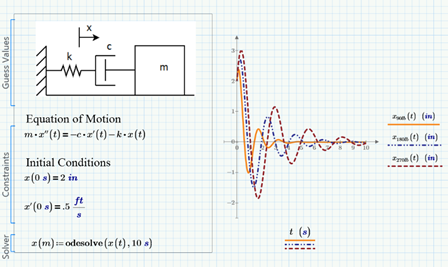
Tutorial - Solving an Ordinary Differential Equation Using Mathcad

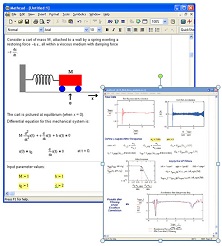
This tutorial shows how to solve an Ordinary Differential equation using Mathcad.

Mathcad Prime 2.0 (includes Mathcad 15)

We're Australia and New Zealand's largest distributor of Mathcad.

Mathcad enables professionals worldwide to perform, document, manage and share calculation and design work. Mathcads easy-to-use whiteboard interface combines live, natural mathematical notation, text and graphs into a single worksheetmaking Mathcad ideal for knowledge capture, calculation, sharing and reuse. 

Mathcad Prime 2.0 is the latest release of Mathcad, the industry standard software for engineering calculations. Completely re-designed, Mathcad Prime provides a task-based interface for enhanced usability. Plus it delivers powerful capabilities within a document-centric calculations environment for users to create complex, professional engineering design documents quickly and easily.

Mathcad Prime

Other features of Mathcad Prime

  • Improved usability and discoverability – Experienced users can complete more tasks with less effort, and new users will spend less time learning to use Mathcad Prime

  • Document-centric calculation environment – Reduce the time it takes to develop a design worksheet, by combining math, text and images on one document. That means less time editing and formatting your worksheet

  • Advanced Math Exploration – Quickly and easily create calculations for testing – before committing them to a design, and reducing re-work in the design process

  • Numeric functions library – With ready-to-use numeric functions, you’ll be able to tackle any computational problem, saving time and effort

  • Dynamic Units Checking – Now you have full support for units throughout all calculations created in Mathcad Prime, resulting in reduced errors and higher accuracy, while improving process efficiency in product development

  • Reverse compatibility – Quickly convert most engineering worksheets saved in previous versions back to Mathcad 7.0, while summarizing any specific compatibility issues, minimising any work to recreate calculations and worksheets

  • WYSIWYG equation editor – Express problem constraints and solutions in natural math notation – focusing on the calculations, while spending less time manipulating the document

  • Design of Experiments (DoE) – Save time, effort and expense by creating fewer, yet more intelligent experiments

  • Maximise productivity with full Windows 7 support

Mathcad 15 and Prime 2.0 comparison

Mathcad is the industry standard software for engineering calculations. Its easy-to-use, live mathematical notation, powerful capabilities, and open architecture enable engineers and organizations to streamline critical design processes.

Both Mathcad 15.0 and the latest Mathcad release, Mathcad Prime 2.0, present calculations, text and images in an understandable format, enabling knowledge capture, reuse and design verification, which results in improved product quality with faster time-to-market.

Mathcad Prime 2.0 required significant re-development for optimization with current operating systems, as a result there are some feature differences between Mathcad v15 and Mathcad Prime 2.0. Please view the following document to help you decide which version of Mathcad is right for you (keep in mind that when you purchase a Mathcad license you receive a copy of both Mathcad Prime 2.0 and Mathcad 15).

View Mathcad Comparison Chart.

What is new in Mathcad 15

Mathcad 15

Highlights of the enhancements in Mathcad 15.0 include:

  • Design of Experiments (DoE) – Over 25 new functions to reduce the time and expense of conducting experiments thru DoE by understanding the variable interactions that will influence the experiment. DoE helps identify critical factors and optimal settings for complex processes. It provides templates for a fewer number of experiments which are indispensable when having multiple variables and levels.

  • Integration to Knovel® Math content – Quickly access the full list of Knovel’s fully documented Mathcad worksheets from Roark’s and Hick’s reference works reducing the time it takes to solve complex math problems.

  • Integration with Kornucopia® software – Kornucopia by Bodie Technology, is designed to reduce time and effort spent on analysis by providing functions and templates using Mathcad-based documented workflows, that improves interpretations and value of experimental data and simulation results

  • Integration to Truenumbers® – Truenumbers by True Engineering Technology enables the ability to easily communicate values across applications and the organization without loss of quantity or unit integrity. Results and values can be moved outside of Mathcad onto different document types – enabling easy sharing of the data

  • Support for Microsoft Excel® 2007 – Leverage the following functions and features with Excel: READEXCEL(), WRITEEXCEL(), READFILE, the data import wizard, and the Excel Add-in

  • Windows 7 support

Computational Capabilities

Mathcad 15
  • High-end numerics - Perform summations, products, derivatives, integrals, and Boolean operations; apply trigonometric, exponential, hyperbolic, and other functions and transforms.

  • Live symbolics - Simplify, differentiate, integrate and transform expressions algebraically; Mathcad’s patented live symbolics technology automatically recalculates algebraic solutions and allows you to use them in subsequent calculations.

  • Vector and matrix handling - Manipulate arrays and performs various linear algebra operations, such as finding eigenvalues and eigenvectors.

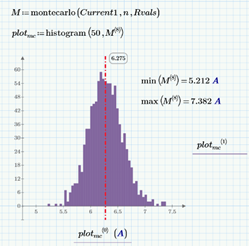
  • Statistical and data analysis - Generate random numbers or histograms, fit data to built-in and general functions, interpolate data, and build probability distribution models.

  • Differential equation solving - Solve linear and non-linear systems of equations and boundary value problems; use solve blocks and natural notation to specify sets of constraints.

  • Design of Experiments functions - Over 25 new DoE functions can be used for constructing experimental design matrices, developing statistical models,
    and performing Monte Carlo simulations.

  • Units support - Include units in calculations, perform unit conversions,and automatically check dimensions. Add domain-specific units.Convert results to any unit system or custom values. Currency units effectively document engineering cost and economic evaluations.

Key Benefits of Using Mathcad

Graphic
  • Calculate, model and visualize your technical ideas while reducing errors

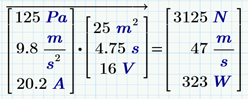
  • Document your calculations using unit-aware math notation

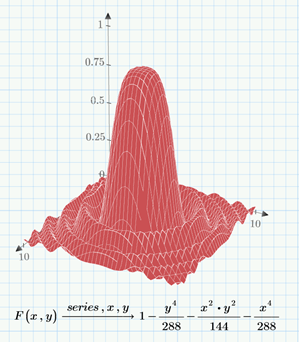
  • Graph and plot your work instantly with built-in 2D and 3D graphing tools

  • Update interactive designs for instant results

  • Verify, visualize and annotate your solutions for all engineering disciplines

  • Integrate your data across applications and systems

  • Publish your results using a wide variety of output formats

  • Reduce errors in your work with automatic unit checking

  • Set your own default unit system and create your own units

  • Automate your operations with templates and style sheets

  • Import and export data easily

  • Design of Experiments (DoE) - Reduce the time and expense of conducting experiments through DoE by understanding the variable interactions that will influence the experiment. DoE helps identify critical factors and optimal settings for a complex process. It provides templates for fewer, yet more intelligent experiments which are indispensable when having multiple variables and levels.

  • Direct access to trusted Roarks and Hicks reference works on Mathcad worksheets by Knovel®

  • Direct access to Truenumbers enables you to communicate values across applications, without loss of quantity or unit integrity

  • Integrate with Pro/ENGINEER® to realize unique predictive engineering capabilities

  • Integrate with Windchill PDMLink® and Windchill ProductPoint® to quickly and securely share and access knowledge contained in Mathcad worksheets

Features

Mathcad 15

Mathematical formats and display

  • Real, imaginary, and complex number support

  • Decimal, binary, octal, and hexadecimal formats

  • Over 200 built-in units with user-defined default options

  • Support for creating user-defined unit systems

  • Engineering and scientific notation display

  • Mixed integer display

  • Explicit calculations enable variables to be displayed in the equations as defined values, improving visual audit and review of calculations

Live mathematics and symbolics capabilities

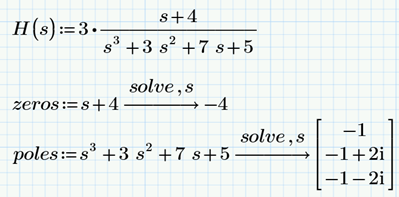
  • Define and evaluate variables and functions numerically or symbolically

  • Manipulate, transform, and extract information from matrices

  • Expand, factor and simplify expressions algebraically

Built-in operators

  • More than 17 arithmetic operators, 12 vector and matrix operators, and 5 summation and product operators

  • 2 derivative operators and 5 integration and limit operators

  • 9 evaluation operators

  • 10 Boolean operators

  • Customized user-defined operator support

  • Arithmetic operations are IEEE-adherent

Graphing and visualisation

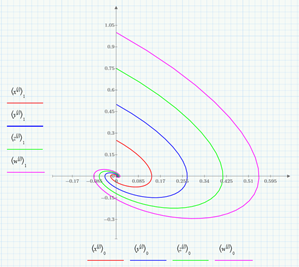
  • Standard engineering plot types: x-y plots, a secondary y-axis, polar plots, bar charts, vector, contour, scatter, and surface plots

  • 2-D and 3 D QuickPlot™ and plot annotation capabilities

  • Interactive plot zoom data point selection, and 3D angle adjustment

  • Detailed plot formatting for numbers, ticks, labels, line types, markers, etc.

  • Image viewer with support for BMP, GIF, JPG, PCX, TARGA, PGM, TIFF

  • Image manipulation (zoom/pan/crop, brightness/contrast, rotate/flip/transpose, etc.)

  • Animation of plots or any calculation

Built-in functions

  • 80+ core mathematical functions and 10 discrete transform functions

  • 110+ statistics, probability, and data analysis functions

  • 18 differential equation and partial differential equation solvers

  • 25+ functions for Design of Experiment

  • 28 file access functions

  • 14 expression-type and string functions

  • 18 finance functions

  • 13 symbolic functions, including numer and denom, for algebraic calculations

  • Data analysis

  • Image and signal processing

  • Vector matrices

  • Plus another 600+ functions

Application customisation and extensibility

  • Native XML file format for simple integration

  • Ability to add user-created functions created in C or C++

  • Embed, link, and automate any OLE-compliant application or ActiveX control in Mathcad using VBScript or JScript

  • Use OLE Automation & Visual Basic to develop solutions incorporating Mathcad computations 

Mathcad 15

Solving capabilities

  • 7 built-in functions for solving linear and non-linear systems and root-finding

  • 18 built-in functions for solving ordinary differential equations and partial differential equations

  • Solve block notation for solving systems of linear, nonlinear, and differential equations in natural notation, along with constraints

  • Programming and parameterization for repeated solutions

Document/text editing features

  • Customisable spell checker with technical terms database

  • Document templates and style sheets

  • Hyperlinking

  • Hide, collapse, and encrypted password lock

  • Support for UNICODE

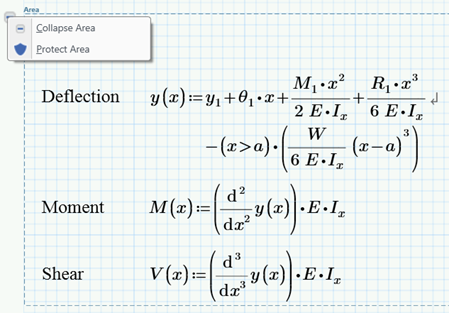
  • Mathematics font allows insertion of formulas directly into text portions of the worksheet

  • Header and footer can be customised for a professional-looking document

Usability features

  • Comprehensive units support

  • Automatic recalculation

  • Easy-to-use equation editor

  • Error tracing and redefinition warnings

  • Multi-step undo

  • Flexible data import features, supporting text and numerical entries, engineering format, real and complex data, cut and paste, and import from a wide variety of file formats (Excel®,fixed width, binary, etc.)

  • Enhanced error messages clarify source of problems

  • Program debugging capabilities

  • Autosave function

File formats, publishing and Web support

  • Save as HTML, XHTML and RTF formats

  • Convert files to Adobe Acrobat® PDF

  • Truenumbers® enables outputs to be moved to any publishing format without losing context or integrity

Data exchange features

  • Enhanced data exchange with Excel 2007 integration

  • Native XML file format for simple data exchange

  • Data Import Wizard

  • Data import for .mat files, Excel files, Lotus® 1-2-3, ASCII, binary and others

  • Microsoft® Access, FoxPro®, and SQL-supported databases, as well as ODBC connectivity

Integration with Pro/ENGINEER

  • Bidirectional integration enables efficient and accurate data exchange between applications

  • Supports dynamic, live updates to calculations and CAD models

  • Values or results of calculations performed in Mathcad drive parameters and dimensions in the CAD model

  • CAD parameters and dimensions can be sent to Mathcad as inputs to calculations

  • Support for units and units conversion

Integration with Windchill

  • Effectively manage Mathcad worksheets

  • Check-in and check-out Mathcad worksheets from either the Mathcad or Windchill user interface

  • Quickly search attribute labels and contents of Mathcad worksheets stored within Windchill

  • Preserve and access all versions of worksheets

  • Improves management and tracking of Mathcad-Pro/ENGINEER dependencies

Connectivity with other applications, including:

  • Built-in integration with Microsoft Excel

  • Built-in integration with MathWorks MATLAB®

  • National Instruments® LabVIEW™

  • Bentley MicroStation®

  • ANSYS® Workbench™

Resources

  • Direct access to Knovel Math content

  • References tables, key formulas and constants

  • Technical support knowledgebase

  • Detailed tutorials across all Mathcad functionality

  • Easy-to-use online help with Search and Index

  • More than 300 QuickSheets for standard analyses and tasks

  • 11 language dictionaries

  • User forums and Web Library

  • Active maintenance customers receive one year of maintenance support


Resources

Application Examples - Mathcad and Economic Debate

Submission to the House of Representatives Economics Committee Inquiry into Home Loan Lending Practices and Processes. Analysis and graphing performed in Mathcad.

Case Studies - Mathcad in Education

Find out how Mathcad enables teaching and learning across a wide spectrum of engineering and scientific disciplines.

Case Studies - Mathcad in Mechanical Engineering

Find out how Mathcad helps mechanical engineers to perform their design calculations.

Case Studies - Mathcad in the Aerospace Industry

Find out how well-known aerospace companies use Mathcad to perform their design calculations.

Case Studies - Mathcad in the Engineering and Construction Industry

Find out how Mathcad helps Uni-Systems to combine structural, mechanical and electrical engineering to design, fabricate and install movable structures.

Case Studies - Mathcad in the Oil & Gas Industry

Find out how Mathcad helps various organisations in the Oil & Gas industry to improve the quality of their engineering design calculations and documentation.

Case Studies - Mathcad in the Power Generation Industry

Find out how Mathcad helps organisations in the Power Generation industry to improve the quality of their engineering design calculations and documentation.

E-book - Creating Amazing Images with Mathcad 14

In this book of mathematical images, Professor Byrge Birkeland vividly illustrates the power of Mathcad as a 2D and 3D graphics tool. He skillfully covers topics like multiple polygon plotting, text on graphs, multiplication tables involving permutation groups, electrical circuit drawing, polytopes, projections, knot rendering via the FFT, tessellations, recursive curves, and fractals.

E-book - Inside Mathcad ODEs and DAEs in Mathcad

This E-book introduces Mathcad methods for solving and optimisation. Since different problems require different tools, this E-book covers: identifying the type of problem / choosing appropriate Mathcad functions for the problem / Using this function correctly / interpreting the solutions correctly.

E-book - Inside Mathcad Programming

This Mathcad E-book module introduces all the various methods of doing mathematics or controlling Mathcad using programming techniques.

E-book - Inside Mathcad Solving & Optimisation

This E-book describes how to solve differential equations in mathcad, including ordinary differential equations (ODEs) and differential algebraic equations (DAEs). The E-book shows how to set up and solve a number of example of ODEs and DAEs that arise in engineering applications.

Examples & Tutorials - 3 Is a Magic Number

Learn the importance of identifying the use and source of numbers in engineering calculations.

Examples & Tutorials - Adding units to X-Y Plots in Mathcad

Learn how to add units to X-Y plots in Mathcad. (To download this Mathcad 11 file right-click on the link, choose 'Save Target As' or 'Save Link As' and select the File Type as 'All Files')

Examples & Tutorials - Best Practice for Converting Excel to Mathcad

Learn how to bring your calculations into an environment purpose-built for engineering calculations - one that supports natural maths notation and units in every equation.

Examples & Tutorials - Calculating the derivative at a point

Learn how to calculate the derivative at a point.

Examples & Tutorials - Creating Polar Plots in Mathcad

Learn how to quickly create polar plots. (To download this Mathcad 14 file right-click on the link, choose 'Save Target As' or 'Save Link As', enter the extension of the file name as XMCD in the 'File Name' and select the File Type as 'All Files')

Examples & Tutorials - Creating Waterfall Plots in Mathcad

Learn how to quickly create waterfall plots. (To download this Mathcad 13 file right-click on the link, choose 'Save Target As' or 'Save Link As', enter the extension of the file name as XMCD in the 'File Name' and select the File Type as 'All Files')

Examples & Tutorials - Data Smoothing Functions

Learn how to smooth your data in Mathcad and return a new data set that contains less noise but retains the basic shape and important properties of the original data.

Examples & Tutorials - Mathcad Programming - If Statements

Learn how to smooth your data in Mathcad and return a new data set that contains less noise but retains the basic shape and important properties of the original data.

Examples & Tutorials - Metadata and source information in Mathcad

When you create Mathcad worksheets that you plan to reuse or pass on to colleagues, you may also wish to capture information associated with your work. Mathcad allows you to record metadata at either the worksheet or equation level.

Examples & Tutorials - Presenting your work in Mathcad

Learn how to improve the layout of your worksheets and insert headers/footers, page breaks and hyperlinks.

Examples & Tutorials - The calculation order in Mathcad

Learn how maths regions in your worksheet depend on other math regions to calculate correctly.

Examples & Tutorials - Working with Money

Learn how to build cost optimisations into your calculations.

Examples & Tutorials - Working with Temperatures

Learn how to use degrees Celcius and degrees Fahrenheit in your Mathcad worksheets.

Examples & Tutorials - Working with Text

This document explains how to format text and customize the look of your Mathcad worksheets for printing or electronic distribution.

Global Maintenance and Support Program - The Benefits of an Active Maintenance Contract

Find out the benefits of PTC's global maintenance support for Mathcad which exceeds industry standards.

Global Maintenance and Support Program - Upgraded Telephone Support Information

Announcement about the roll out of an upgraded telephone support system for PTC customers in Australia and New Zealand.

Global Maintenance and Support Program - Your PTC.com Web Account Manual

Review and track information regarding your company’s licenses, installations and maintenance status and lodge technical support calls with your PTC Web account.

Mathcad 15.0 - Data Sheet

Find out how you can create and document critical engineering calculations using Mathcad 15.

Mathcad 15.0 - Extension Packs

Find out how the Mathcad Extension Packs add valuable functionality to your engineering calculation environment.

Mathcad 15.0 - Mathcad Mathematical Functions List

Mathcad and the Mathcad Extension Packs give you access to hundreds of powerful mathematical functions that enable you to solve your critical scientific and engineering calculations with ease.

Mathcad 15.0 - Version Comparison Chart

Find out about the latest features of Mathcad.

Mathcad 15.0 - What's New

Find out about the new features in Mathcad 15.

Mathcad Events - PTC Solution Day 2010 Agenda

This is the agenda for a 1-day conference open to industry professionals interested in technical calculations, product development, publishing and content management. Date: Friday Jan 29, 2010 (8.30 am - 5 pm). Venue: Rydges Hotel North Sydney, 54 McLaren Street North Sydney. For more details please see the Events section of our website.

Mathcad Prime 1.0 - Data Sheet

Find out how you can create and document critical engineering calculations using Mathcad Prime 1.0.

Mathcad Prime 1.0 - FAQ's

Find out the answers to your questions about Mathcad Prime 1.0.

Mathcad Prime 1.0 - What's New

Find out about the new features in Mathcad Prime 1.0.

Mathcad Prime 1.0 and Mathcad 15 Comparison Chart

Find out which version of Mathcad is right for you.

Third Party Add-ons - Mathcad - ESRD's StressCheck Integration

Reduce errors that result from manual transfer of data between applications by automatically exchanging data between Mathcad and ESRD's StressCheck Finite Element Analysis software for Civil and Structural Engineering applications.

Third Party Add-ons - Mathcad Add-In for Microsoft Excel

The Mathcad Add-In for Microsoft Excel lets you add Mathcad calculations and plots to your Excel worksheets with full access to worksheet data. The add-in features a 3D plot wizard, easy mapping between Excel ranges and Mathcad variables, automatic recalculation, and online help.

Third Party Add-ons - Mathcad/ANSYS Integration

The Mathcad-Ansys integration allows Mathcad to act as a "plug-in" within Workbench to manage parameters. Engineers can automatically exchange data and calculated values between Mathcad and the Ansys Finite Element Analysis modeling solution, supporting dynamic, live updates to calculations.

Third Party Add-ons - Mathcad/AutoCAD Integration

This integration provides AutoCAD users an ability to create geometry through rule based or constraint based analysis. Mathcad creates 2D profiles and AutoCAD can be used to render them in 3D, and add these mathematically constructed objects to existing drawings.

Third Party Add-ons - Mathcad/LabVIEW Integration

The integration between Mathcad and National Instrument's LabVIEW software allows the automated creation of scripts from Mathcad to drive measurement and automation tasks within LabVIEW.

Third Party Add-ons - Mathcad/Microstation Integration

Through the automatic exchange of data between Mathcad and Bentley Microstation software (for building, plant, civil, and geospatial engineering), engineers can achieve a single platform to integrate calculations with results from engineering software applications used to support the entire product/project development process.

Third Party Add-ons - Mathcad/Pro/ENGINEER Integration for Pro/ENGINEER Wildfire 2.0

An introduction to enabling predictive engineering by adding Mathcad "function" to Pro/ENGINEER's "form" and "fit".

Third Party Add-ons - Mathcad/Revit Integration

Revit and Mathcad working in tandem creates a best of breed solution for building architects and designers. Revit as the front end CAD design software and Mathcad as the analysis engine providing knowledge capture.

Third Party Add-ons - Mathcad/SolidWorks Integration

This integration provides users with an opportunity to combine both products, allowing Solidworks dimensions to drive Mathcad calculations. The results of those calculations can then be sent back to Solidworks to optimize the design.

White Papers - Mathcad in the Aerospace & Defence Industry

Learn about the impact of Mathcad in the Aerospace & Defense Industry.

White Papers - Moving Beyond the Limitations of Spreadsheets

Find out how the simultaneous design and documentation of design calculations promotes engineering excellence.

Back to Top